Start with the public video link
You can watch some public TikTok videos without an account by opening their links in a web browser. If you only know the creator’s username, start with their public profile. Neither route requires installing the TikTok app just to try viewing.
Whether playback works depends on the post, your region and the website’s guest-access behavior. A browser viewer such as ttokviewer offers another public-link workflow, but cannot unlock a private, removed or restricted video.
Which viewing method should you use?
| What you have | Try this | Important limit |
|---|---|---|
| A shared video link | Paste it into Safari, Chrome, Edge or Firefox. | TikTok may still show a login or app prompt. |
| A public link that is awkward to open | Paste it into a browser-based TikTok viewer. | The viewer still needs accessible public media. |
| A creator’s username | Open their TikTok profile, or search for the handle in ttokviewer. | Public results can be incomplete or unavailable. |
| A clip shared on another platform | Look for the creator’s own upload there. | It may be a different edit, with a different discussion. |
Watching without the app and watching without an account are separate choices. You can use TikTok’s website while signed in, and you can sometimes view a public post while signed out. A browser tab alone does not tell you which applies: check whether TikTok shows your account avatar or a sign-in control.
Watch TikTok without the app on iPhone or Android
Use your main browser rather than a message preview
On iPhone, paste the shared link into Safari or your preferred browser. On Android, use Chrome or another browser you already have. A chat app’s built-in preview may expose fewer controls or repeatedly send you toward the TikTok app.
If the link keeps reopening an installed app, copying the address and pasting it directly into a browser is worth trying. The behavior depends on your device’s link settings; it is not necessary to uninstall TikTok just to check a public URL.
If TikTok asks you to install or sign in
Look for an actual option to stay on the website. The labels in third-party guides, such as “Not now,” are examples, not controls guaranteed to appear on your screen. If available, your browser’s desktop-site mode is another way to try the web layout. It can change the interface, but does not remove access restrictions.
For a public post, try the same link in ttokviewer if the official mobile layout is difficult to use. Tap Play and enable sound after the page opens. Browsers can block automatic audio, so a silent first frame does not necessarily mean the clip has no soundtrack.
Watch TikTok on a PC or Mac without an account
- Open the shared post URL in a desktop browser.
- Check whether the post loads while you are signed out.
- Use the video controls to play, pause and adjust sound.
- Open the creator’s public profile if you want to look for more works.
A desktop browser can be easier for reading captions and comparing posts, but it does not guarantee more guest access. If TikTok requires authentication for the content, changing from a phone to a laptop may not help.
When several people send you links, opening each in a browser tab is enough to compare available clips. You do not need a desktop downloader just to watch. For offline copies, use the separate iPhone, PC and Mac download guide; a playing browser tab is not a downloaded file.
How to find TikTok videos when you only know a username
Start with the exact handle, including dots or underscores. A display name can be shared by multiple accounts, while the handle identifies the profile more precisely.
- Open tiktok.com/@username with the actual handle, or enter the handle in ttokviewer’s search box.
- Check the avatar, bio and account name before choosing a result.
- Open the public profile, then choose a work from its Videos tab.
- If a familiar handle gives no result, check the original shared link; the creator may have changed their username.
The TikTok account viewer guide explains this profile-first workflow. A keyword search is useful for discovery, but should not be treated as a complete or identically ranked copy of TikTok’s own search results.
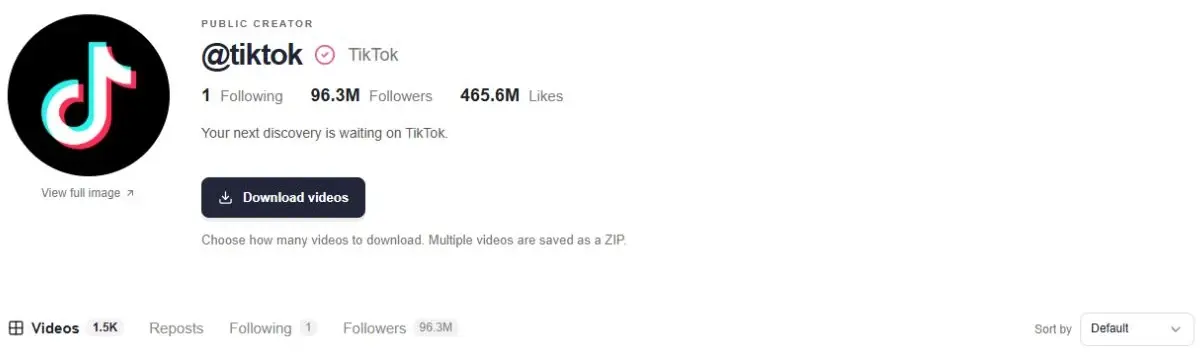
If you cannot locate the TikTok version, check whether the creator links to a YouTube, Instagram or other public account. Their own cross-post may let you watch the clip elsewhere. Check the upload and account carefully: a repost can be shortened, recaptioned or unrelated to the original discussion.
What can you do without logging in?
Guest viewing is mainly useful for reading and watching available public content. It should not be confused with having a TikTok account that can participate in the conversation.
| Task | What to expect |
|---|---|
| Play a public video or open a profile | May work in a browser or public viewer; access varies. |
| Read comments and replies | Only when the page or provider makes them available. A displayed count does not guarantee every reply can be loaded. |
| Like, follow or post a comment | These are TikTok account actions. Viewing a profile in ttokviewer does not follow it. |
| Access Favorites or personal watch history | Requires your own TikTok account context; ttokviewer does not import it. |
| Open private or restricted content | A public viewer does not provide access. |
For available public discussions, ttokviewer lets you inspect replies and offers comment export controls. See the TikTok comment viewer guide for that separate workflow. Reading or exporting a discussion does not let you reply through ttokviewer.
Why won’t a TikTok open without the app?
| What happens | What to try |
|---|---|
| The link opens an app store | Copy it into your main browser. Try a desktop browser or the browser’s desktop-site option. |
| A login prompt blocks playback | Use a guest control only if offered. Try the public link in a viewer, without assuming it can resolve the restriction. |
| The player is silent | Tap Play, unmute it and check device volume. Automatic audio may be blocked. |
| The post says unavailable | Recheck the original link. It may be removed, private or restricted. |
| ttokviewer loads the profile but not the video | Public metadata and playable media can fail independently. Retry later or check the original post. |
Repeatedly refreshing will not make a deleted clip public again. If you need the exact video and no available route works, ask the sender or creator for a viewable copy. A different browser is a troubleshooting step, not a way to recover inaccessible content.
Does watching without an account mean anonymous?
Not signing in avoids attaching the visit to a signed-in TikTok account in that browser session. It does not mean that websites receive no technical information: browsers still make network requests, and cookies or other session data may be present.
A private browsing window does not automatically hide your network address. A third-party viewer also has its own privacy policy. Keep “no TikTok login needed” separate from claims of total anonymity.
If your question is what a creator can see about a profile visit, read how TikTok Profile view history works. That guide covers profile, video and Story distinctions; switching to a viewer does not erase earlier activity on TikTok.
Open the public content you came for.
Search for a creator or paste a work link, then explore the available video, caption and discussion.
Try ttokviewerFrequently asked questions
Can I watch full TikTok videos without an account?
Some public posts play in full while signed out. Guest access is variable, so opening a preview does not guarantee full playback for every post. Private, removed or restricted content is outside a public viewer’s scope.
Can I watch TikTok without the app on iPhone?
Try pasting the shared link into Safari or another browser. If the mobile website blocks guest playback, you can try a public-link viewer or a desktop browser. Neither approach guarantees that a particular video is available.
Do I need a TikTok account to use ttokviewer?
The public viewing workflow described here does not require connecting a TikTok account. Enter a handle or public post link. ttokviewer cannot access your private Favorites, messages or watch history.
Can I follow or comment without logging in?
Following, liking and posting comments are TikTok account actions. ttokviewer can display available public content and discussions, but does not submit those actions for you.
Can a viewer open a private TikTok account?
No. A public viewer does not unlock private profiles, restricted works or deleted media. Ask the creator for access or a shareable copy when appropriate.
Can I save a video to watch offline?
Only if an accessible download is available. Follow the device-specific TikTok download guide and verify the saved file. A browser bookmark keeps the URL, not an offline copy.
Sources & editorial notes
This guide compares an accessible third-party viewing tutorial, a link-viewer interface and ttokviewer’s current public-content workflow. The TikTok help URL below redirected to an error page during review, so its article text could not be checked. Browser suggestions are troubleshooting options, not a claim of testing every device or guaranteeing guest access. Product screenshot uses TikTok’s official account.
- NoteBurner: How to Watch TikTok Without App in 3 Ways — structure and browser-method reference; vendor claims are not independent performance tests.
- WatchWithout — public-link viewing interface.
- TikTok Help Center: Using TikTok without an account — official reference; text unavailable during this review.