Review audience questions
Read the questions under a product demo, tutorial or creator post. Expand replies before interpreting a short comment, since another participant may have supplied the answer or added missing context.
View available comments on a public TikTok work, expand replies, and export the conversation as CSV or Excel without copying each line by hand.
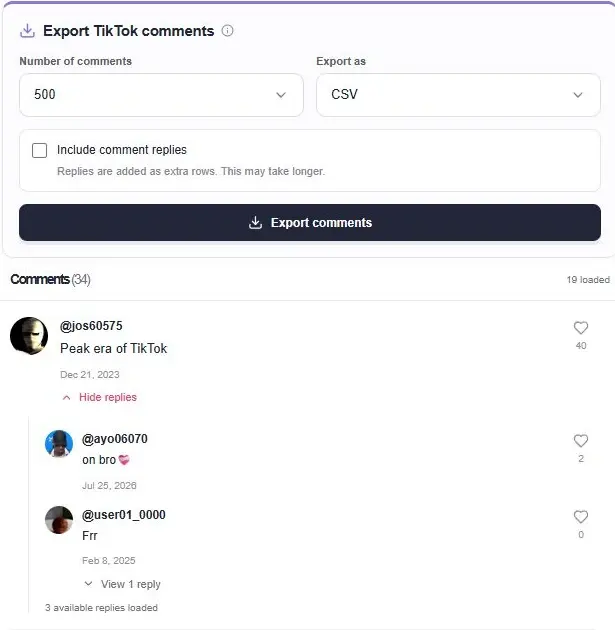
The TikTok comment viewer starts with one public video or photo post. Open the work to browse available comments, see authors and like counts, and expand reply threads. The player stays alongside the discussion so you can check what people are responding to.
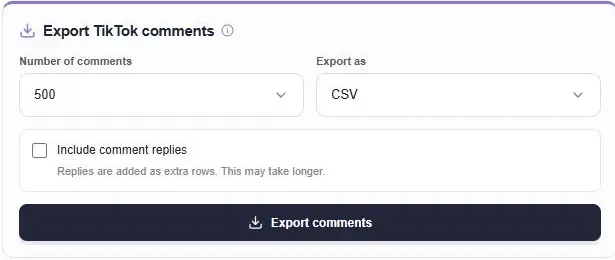
When you need the text outside the page, the TikTok comment exporter collects available comments into CSV or Excel. Choose a quantity and whether to include replies. This is a post-level workflow for reading and exporting a discussion, not a search across every comment on TikTok.
Explore available reply threads in the work page. Pagination keeps the first view manageable while letting you continue through the discussion.

Choose a quantity and whether to include replies. Export collection can request further pages beyond those already visible, subject to what the provider returns.
Read the questions under a product demo, tutorial or creator post. Expand replies before interpreting a short comment, since another participant may have supplied the answer or added missing context.
Export available comments and review them in Excel or another spreadsheet tool. You can sort or filter the downloaded file yourself to organize repeated questions, feedback or usernames.
Include replies when you need conversation structure. Comment IDs and parent IDs help distinguish top-level comments from responses, rather than treating every exported row as a separate discussion.
Paste the full public work URL and open the comment page. Choose the number of comments in the export panel, select CSV or Excel, and decide whether to include comment replies. Start the export and follow the collection progress.
You do not have to scroll through all comments first. The export can request further pages up to the selected quantity, subject to returned data. Including replies can take longer because the exporter also needs to collect the available response threads.
CSV is a plain table format that works with many spreadsheet and data tools. Excel (.xlsx) is useful when you want a workbook to open directly in Microsoft Excel or compatible software. Both options export the available comment records rather than screenshots of the conversation.
To look for a username or phrase, use your spreadsheet’s search or filter tools after exporting. That search only covers the records in your file. It cannot locate someone’s complete comment history on other posts or recover comments that the source did not return.
Enable Include comment replies before exporting. Available replies are collected as additional rows, with comment and parent IDs preserving their relationship. Reply collection can take longer, and replies that the source does not expose cannot be reconstructed.
Use the displayed cancellation control while the collection is running. If you only need a small sample for review, choose a smaller quantity before starting. Export size depends on returned records; changing the limit does not make unavailable comments accessible.
Open the public video or photo link through the input above. Available comments appear on the work page, with more loaded as you browse. Expand a reply thread to read its available responses. You do not need to connect a TikTok account for this workflow.
Yes. Select Excel in the Export as control to request an .xlsx workbook. CSV is also available. Set the export quantity and reply option before starting; the actual result depends on how many comment records the source can return.
A displayed comment total and a returned comment list are different pieces of data. Filtering, unavailable comments, reply counts and source limits can affect the result. The selected quantity is a collection limit, not a promise that exactly that many records exist or can be retrieved.
You can search or filter usernames in the exported spreadsheet. This tool starts from one public post; it does not search all TikTok posts for everything written by a person. A username missing from your export only means it was not found in that collected set.
Start with content that is publicly available.