Yes, in some circumstances.
Someone can see that you viewed their TikTok profile when both of you have Profile view history turned on and your visit falls within its 30-day window. A profile visit alone does not automatically reveal you to every account you open.
If either person has the setting off, the visit is not shown through that feature. Likes, follows, comments and Story views are separate, so turning off profile history does not make all your activity invisible.
When does TikTok show a profile visit?
Profile view history is a two-way feature: enabling it lets you see eligible visitors and lets other participating accounts see your visits. It is not a complete list of everyone who has opened a profile.
The TikTok profile view history guidance, also referenced by the independent guides below, describes a 30-day history and eligibility for people aged 16 or older with fewer than 5,000 followers. If the option is missing, check eligibility and the settings available in your app before assuming it is broken.
| Your history | Their history | Can your visit appear in their list? |
|---|---|---|
| On | On | Yes, within the feature’s 30-day window. |
| Off | On | No, through Profile view history while it is off. |
| On | Off | No, while their history is off. |
| Off | Off | No, through this feature. |
This table describes the profile-history feature with the settings shown. It does not promise what happens to an earlier visit after settings change.
For example, if you and a creator both have history enabled, opening that creator’s profile can make your account appear in their history. You do not need to follow each other for the profile-history rule to matter.
A profile view is different from a video or Story view
“Can they see I watched their TikTok?” can mean three different things. Decide which action you took before checking the privacy setting.
| Your action | What to check |
|---|---|
| Opening someone’s profile | Profile view history and whether both accounts have it enabled. |
| Watching a regular video or photo post | Post view history has its own rules. A public view count is different from a named viewer list. |
| Watching a Story | Story owners can see viewers. Do not use your profile-history setting as a guarantee about Stories. |
| Liking, commenting or following | These actions can identify your account independently of browsing history. |
TikTok documents Post view history and TikTok Stories separately. The safe conclusion is not “TikTok never shows video viewers.” It is that disabling profile history only addresses one kind of activity.
If you simply want to open a public video from a link, our TikTok video viewer guide explains that workflow. A third-party viewer cannot change what TikTok has already recorded from activity in its own app.
How to check Profile view history before browsing
If you do not want future profile visits shared through this feature, check the setting before opening the account. The usual app path is:
- Open TikTok and go to Profile.
- Open the menu, then choose Settings and privacy.
- Go to Privacy, then Profile views.
- Check the Profile view history switch and turn it off if you do not want to participate.
Menu labels and entry points can differ by app version. Some accounts also have a profile-views shortcut on the profile screen. If you cannot find the option, use TikTok’s in-app help rather than looking for a third-party “hidden visitors” service.
The trade-off is reciprocal: when you turn history off, you also lose access to the participating visitors it would otherwise show you. Making your account private is a separate choice; it should not be treated as a replacement for checking profile history.
Need help finding the switch? Follow our step-by-step guide to turning off TikTok Profile view history, including alternate entry points and checks for a missing setting.
What about repeat visits or switching the setting later?
I already visited. Will turning it off remove the visit?
Do not rely on switching the setting afterward to undo an earlier visit. Published guides disagree about whether earlier entries disappear and what happens when history is enabled again. We have not verified those transitions through controlled account testing, so this guide does not promise retrospective removal.
Even if an entry later stops appearing, someone may already have seen it. Checking the setting before your next visit is more useful than trying to erase an action afterward.
Can they see how many times I opened their profile?
A visitor list should not be read as a per-person visit counter. Seeing an account listed does not by itself establish how often that person visited, how long they stayed or why they opened the profile. Avoid tools claiming to reveal exact repeat visits without a verifiable source.
Does leaving quickly or avoiding the Follow button help?
There is no reliable “leave within a few seconds” rule to use as a privacy strategy. Following and profile history are different actions. Check the history switch instead of assuming a short visit or an unfollowed account is excluded.
What if I browse in an incognito window?
Incognito mode does not change an account setting. If you log in to TikTok in that window, check the same settings you would elsewhere. Browsing logged out is a different session, but public access can vary and may lead to a login prompt. It is not a guarantee of anonymity across the internet.
Just want to look at a public creator’s profile?
Sometimes the goal is simpler than managing visitor history: you have a creator’s handle and want to inspect their public posts without connecting your own TikTok account to another service.
ttokviewer’s TikTok account viewer lets you search for a public creator or paste a profile link. You can explore the profile and available posts without providing TikTok login credentials to ttokviewer. The image below shows the profile layout you can expect.
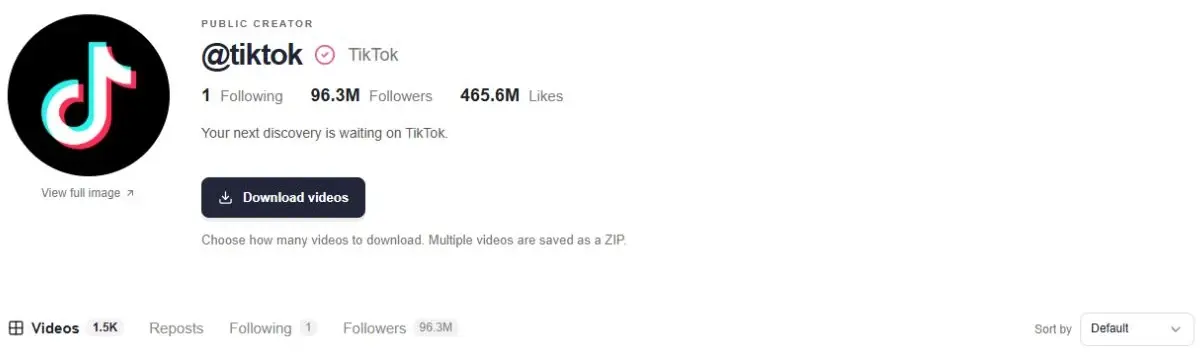
This is a way to explore available public content. It does not unlock private profiles, reveal hidden visitors or remove activity already recorded on TikTok. If you open a TikTok link from the page, TikTok’s own session and settings apply there.
If your next task is reading a discussion rather than browsing a profile, the TikTok comment viewer provides a separate workflow for available public comments and replies.
Start with a public profile.
Paste a TikTok handle or profile link to explore available public content.
Open ttokviewerFrequently asked questions
Can someone see that I searched for their username?
Searching a username and opening a profile are different actions. Profile view history concerns profile visits; it is not a list of people who typed a name into search. If you open the profile from the results, the profile-history conditions become relevant.
Does an empty profile-view list mean nobody visited?
No. It only reflects the visits the feature can show. People with history off, visits outside its window and eligibility limits mean it is not a complete audience measurement tool.
Can a third-party tool show hidden TikTok profile viewers?
Do not assume it can. A public-content viewer has no basis for promising a hidden list of named visitors. Avoid giving a service your TikTok password to supposedly reveal people who viewed you.
Will turning off profile views hide my comments and likes?
No. Profile view history does not undo interactions. If you comment, like or follow, the account can be identifiable through that action even when profile history is disabled.
Sources & editorial notes
Written by ttokviewer to explain profile-view privacy and the limits of public-content viewing. This article synthesizes the guides below; it does not report a controlled TikTok account experiment. TikTok’s support pages are the primary place to check current feature rules. Their full text was not retrievable during this review, so the conditions above were cross-checked against accessible secondary guides.