Save your own published videos
Start with your public creator profile and collect the available video files in a batch. Check the results before treating the download as a backup, since inaccessible or failed works may be missing.
Start from a public creator’s profile, choose a video quantity, and collect available works for a batch download with visible progress.
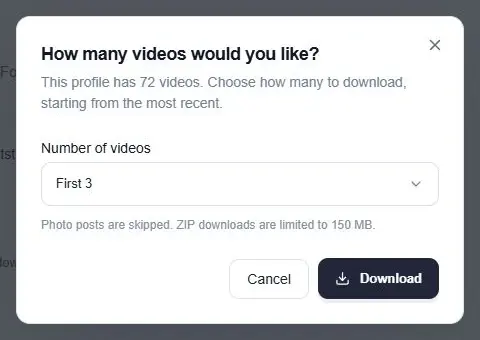
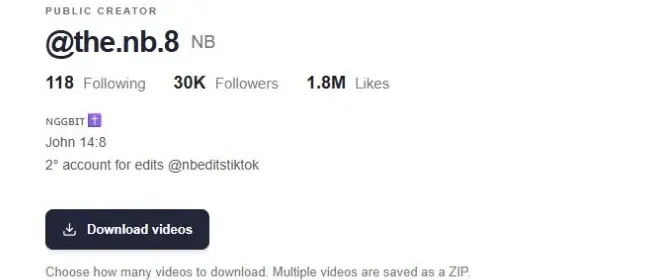
The bulk TikTok video downloader starts from a username rather than a list of video links. Open a public creator profile, choose Download videos, and select how many works to collect. The flow can request additional pages without making you scroll through every card first.
Bulk, batch and mass TikTok download describe this same profile-based workflow. It is useful when you need more than one available video from a creator. The confirmation dialog lets you choose the scope before collection and downloading begin.
The profile’s download flow can request further pages itself. You do not need to scroll to the end before selecting a quantity in the download dialog.
The batch follows the works available from the source. Browser download permissions, media access and expiring links can affect individual files; it cannot guarantee a complete account archive.
Start with your public creator profile and collect the available video files in a batch. Check the results before treating the download as a backup, since inaccessible or failed works may be missing.
Choose a quantity for videos you own or have permission to save. Downloading a publicly viewable file does not itself grant permission to republish it or use its music in a different project.
Use the quantity dialog even when only the first rows are visible. The collector can request more works for the batch while the profile’s browsing grid remains a separate view.
Enter the handle or public profile URL above to open the creator page. Choose Download videos, select an available quantity, and confirm the request. The batch collects accessible works and displays progress as it proceeds.
Multiple videos are saved as a ZIP through the current download flow. Photo posts are skipped, and ZIP downloads are limited to 150 MB. For a large creator library, use smaller batches and review the reported result instead of assuming that every upload was included.
A public work count can be larger than the set that the source makes accessible. Collection may stop before the reported total, and individual media links can expire or reject a download. Choosing a larger quantity cannot recover private or unavailable files.
File quality and watermark availability depend on the media returned for each work. This page does not promise 4K files, watermark removal or a complete account archive. Keep the original creator and work information with your saved reference material so you can check its source later.
An individual media URL can expire or reject a request, and browser download settings can also affect saving. Review the progress and per-item failures. A completed batch is not a guarantee that every video shown in the profile total was downloaded.
No. Available quality and watermark status depend on the media supplied for each work. ttokviewer does not upscale files to 4K or promise watermark removal. Check the saved files for the quality you need before relying on them.
No. Open the download dialog from the creator profile and choose the quantity. The collector can request further work pages beyond the cards you have already loaded. The returned files still depend on which works and media links are accessible.
Use the public profile URL or its @username to open the creator page, then choose Download videos. This batch flow collects that creator’s available works. It does not accept an arbitrary list of unrelated video URLs as a single batch.
The video batch skips photo posts. A photo slideshow is a set of images and is not automatically converted into an MP4 by this download flow. Review a photo post on its own work page when you need to inspect its available images.
No. This flow starts from publicly available creator works. It does not access private favorites, subscriptions or a hidden playlist. Public viewing and downloading also do not change the creator’s rights over the video or its soundtrack.
Start with content that is publicly available.