Find the question, then make the answer easy to recognize
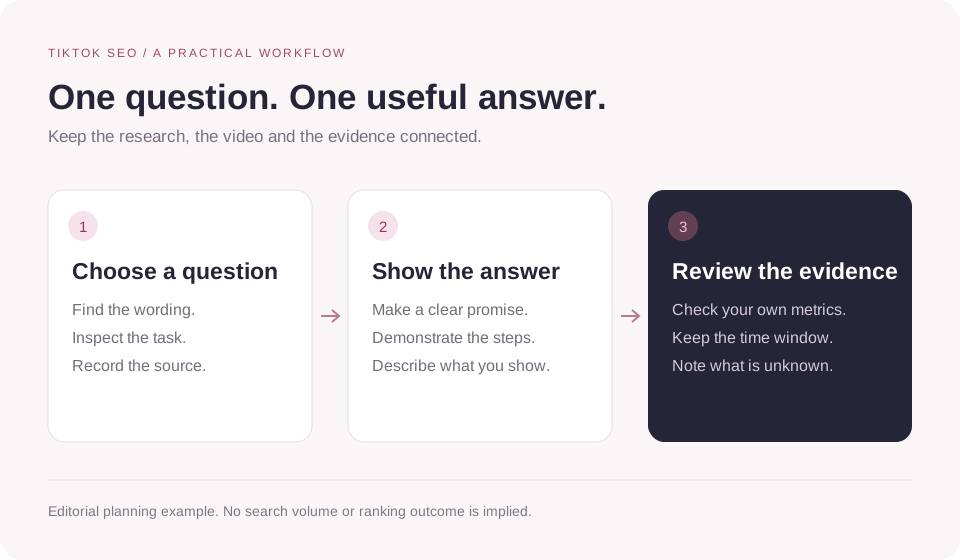
TikTok SEO means planning and describing a video around a relevant search question. Gather candidate phrases from TikTok search and Creator Search Insights where available, inspect what each query asks for, then choose one your video can answer. Use that topic naturally in the opening, visible text and description, and review your own available search performance after publishing.
For example, “how to clean a laptop screen” calls for a demonstration. A caption that repeats “laptop” ten times cannot supply the missing steps. The workflow below starts with the searcher’s task and ends with a record of what you actually published.
What TikTok SEO can help you plan
A search query is a clue about what someone wants to do. “Beginner watercolor supplies” suggests a shopping or setup question; “watercolor paper buckling” suggests a problem to diagnose. Both concern watercolor, but they need different videos.
TikTok’s March 2024 Creator Search Insights announcement describes a tool for finding topics people search for, including topics with a content gap. That supports using search demand to inform ideas. It does not establish a formula that guarantees where a video will rank.
Keep three kinds of evidence separate
| What you inspect | What it can tell you | What it cannot establish |
|---|---|---|
| A TikTok search result | The videos and formats returned for that query in that session. | A universal position that every viewer sees. |
| Creator Search Insights | Topic and demand signals available in that TikTok tool. | A guaranteed audience or result for your next upload. |
| A Google keyword tool | Ideas and estimates for the database and search engine it measures. | TikTok search volume just because the phrase is the same. |
Search discovery and the For You feed are also different places to be found. A rise in total views alone cannot show that a keyword decision improved search traffic. Keep the source of each metric with the number.
1. Find candidate TikTok keywords
Start with the questions you can answer
Write down a few tasks your audience brings to your subject: choosing a product, fixing a problem, learning a technique or comparing two options. Add a useful constraint, such as a device, skill level or available equipment. This gives you a research list with a purpose.
For an artist, “watercolor” is a starting subject. “How to mix a muted green with two paints” is a video idea you can demonstrate. Treat your wording as a candidate until you have checked it, rather than presenting an invented phrase as a verified popular search.
Inspect TikTok search suggestions and results
Try a candidate in the TikTok search interface available to you. If suggestions appear, note relevant variations. Run the search and inspect several results: do they teach a process, compare products, show inspiration or answer a specific problem? Record the date and language or region context you used.
Keep a suggestion as a wording clue. Without a reported metric, you do not have a monthly search count or proof that one suggestion is more popular than another. A result’s visible view count is a property of that video, not the search volume of the phrase.
Use Creator Search Insights where available
The official launch guide says creators can find the tool by searching for “Creator Search Insights.” It describes topic categories, recommendations related to the creator’s content and a content-gap filter. Use the options actually offered in your account; that 2024 announcement is not a guarantee of today’s interface or availability everywhere.
TikTok describes content-gap topics as subjects searched for often but featured in relatively few videos. A gap is a prompt to investigate: can you give a useful answer, and do the results actually leave something unresolved? It is not proof of an easy ranking opportunity.
If the tool is unavailable, continue with observed search results and questions from your audience. Keep the demand field blank when you cannot verify it. A smaller, honest worksheet is more useful than a list padded with guessed volumes.
2. Choose one question your video can finish answering
Assess the phrase alongside the work needed to satisfy it. Can you show the result? Do you have the materials or experience? Would a viewer need an explanation that cannot fit into the video you plan to make?
Use a simple worksheet to make the decision visible. The rows below are hypothetical planning examples, not verified search suggestions, measured demand or published results.
| Candidate phrase | Searcher’s task | Video you can deliver | Decision |
|---|---|---|---|
| watercolor | Unclear without more context. | A lesson about mixing one color. | Narrow the question before filming. |
| how to mix muted green watercolor | Make a less saturated green. | Show the paints, small adjustments and finished swatches. | Research this candidate further. |
| best watercolor paint set | Choose between products. | You only have one set to demonstrate. | Leave out the comparison claim. |
For your own sheet, add the source of the phrase, observation date, what existing videos answer and the missing detail you can supply. Choose a main question and a few natural supporting terms. Do not give yourself a keyword-density target.
Public examples can help you check the format. Open an available post with the TikTok video viewer to read its caption alongside the clip, or use the account viewer to examine a creator’s available works. These show public content; they do not reveal which searches brought another creator traffic.
3. Carry the question through the video
Once you have chosen the task, write a one-sentence promise: “After watching, the viewer can…” Use that sentence to decide what footage belongs in the video. Show the answer early enough that someone can recognize what they are about to learn.
| Part of the post | Editorial check |
|---|---|
| Opening and demonstration | Name or show the problem, then provide the promised steps or comparison. |
| Spoken explanation | Use the subject’s normal language when speech is useful. Do not force repeated exact phrases. |
| Visible text | Make the question, materials or important step legible. Keep useful text on screen. |
| Post description | Describe the specific answer and any constraint the viewer needs to know. |
| Captions or subtitles | Check names and technical terms, and keep the explanation understandable. |
These are editorial checks for a coherent post, not published ranking weights. The primary sources reviewed for this guide do not establish a required number of spoken keywords, text repetitions or seconds before the main phrase must appear.
Choose relevant hashtags after the description makes sense on its own. The separate guide to choosing TikTok hashtags covers tag research, broad versus niche labels and #FYP questions. A search-focused video still needs to deliver the answer behind those labels.
A worked example: from a broad topic to a clear video
Suppose you want to teach a small watercolor technique. This is a made-up planning example; the query, script and description have not been tested for search performance.
The question and the promise
Start with “green watercolor,” then investigate the more specific candidate “how to mix muted green watercolor.” The intended viewer already has paints and wants to soften an overly vivid green. Your promise is to show one repeatable mixing process using the paints you actually have.
The opening and what to show
An opening could be: “This green is too bright for the leaves I’m painting. Here’s how I adjust this mix, one small addition at a time.” Show the starting swatch, identify the paints used, film each adjustment and place the final swatch next to the original.
Visible text could read “Mixing a muted green” followed by the paint names. Show the intermediate result instead of cutting from the first mixture straight to the finished painting. That gives the viewer evidence of the process the title promises.
The description and what to leave out
A draft description: “How I mix a muted green watercolor with this palette. Starting mixture, small adjustments and side-by-side swatches.” Replace “this palette” with the actual materials when you publish.
Leave “best watercolor set” out unless the video compares sets. Leave unrelated trends out too. If viewers later ask whether the same method works with their paints, that is a question to investigate for a follow-up, not a reason to add an unsupported universal claim.
The useful difference is visible in the plan: one search question, one demonstration and one description of what the viewer gets. No invented view counts or search results are needed to explain the choice.
4. Review search performance without inventing a ranking story
After publishing, inspect the analytics and search information your own TikTok account makes available. If it shows search traffic, search queries or post-level search performance, record the exact metric label and reporting period. If those fields are absent, mark them unavailable rather than estimating them from total views.
The following review log is an editorial template. It does not assume that every account has identical analytics screens or query-level data.
| Record | What to enter |
|---|---|
| Post and intended question | The video link, publication date and search task you planned to answer. |
| Research evidence | The phrase source, observation date and available topic signal. Use “not measured” where needed. |
| Reporting window | The exact dates and metric labels shown in your account. |
| Search evidence | Available search metrics or queries; keep them separate from total views and feed traffic. |
| Questions and next change | What viewers still ask, what you can answer next and what else changed between posts. |
Compare posts at a similar age using the same reporting window where possible. Note differences in topic, format, audience and distribution. If several things changed, an improved result cannot isolate the effect of your chosen phrase.
A manual search is a spot check, not a controlled ranking test. Record what you saw and the session context. Avoid turning a single screenshot into “this video ranks first for everyone.”
Comments can reveal an unanswered question or confusing term. The comment viewer and export workflow can help you review available public discussions. Comments are qualitative research, not a complete search-demand dataset, and an export may include only what the source returns.
Read the video and the conversation together.
Review an available public post, its caption and the questions viewers ask. Keep your own search analytics in TikTok.
Explore a public videoCommon TikTok SEO mistakes to avoid
- Choosing a big phrase before checking what the searcher wants. A tutorial, product comparison and inspiration reel can share a subject while serving different tasks.
- Calling Google search volume or an advertising metric TikTok organic search demand. Keep each tool’s scope attached to its numbers.
- Using captions or text to promise an answer the footage never supplies. Revise the video or narrow the promise.
- Hiding or repeating keywords to satisfy a supposed formula. No such formula is established by the sources reviewed here; keep text readable and relevant.
- Assuming a file rename, a search label or a hashtag combination proves a ranking gain. Check actual performance before making that claim.
- Reporting an imagined case study. Label planning examples as examples, and keep observations separate from explanations you have not tested.
Use what you learn to improve the next answer. A clear follow-up that resolves a real question is a concrete next step even when the available metrics are incomplete.
Frequently asked questions
How do I find keywords for TikTok SEO?
Start with tasks your audience needs help with. Inspect relevant TikTok searches and suggestions, then use Creator Search Insights where available to investigate topic demand. Record where each phrase came from and choose a question your video can actually answer.
Can I use Google keyword tools for TikTok?
They can suggest topics and wording, but the metric belongs to the search engine and database the tool measures. A Google monthly search estimate is not a TikTok search count. Check the phrase inside TikTok before building a video around it.
Do I need a certain number of keywords or hashtags?
The sources reviewed for this guide do not establish a required keyword density or a universal tag count. Choose a clear main question, use natural supporting language and include only tags that fit. See the separate hashtag guide for tag selection.
Do I have to say the keyword out loud?
Use speech when it helps explain the subject. This guide does not treat an exact spoken phrase as a requirement for every video or a verified ranking switch. Make the answer understandable through the combination of demonstration, readable text and explanation that fits the format.
How long does TikTok SEO take to work?
There is no verified fixed ranking deadline in the sources reviewed here. Set a review period, compare posts at a similar age and record whatever search information your account provides. A quiet first day or a spike in total views does not by itself establish a search result.
Can ttokviewer show the search keywords behind another creator’s views?
No. ttokviewer helps you inspect available public profiles, videos and discussions. It does not expose another account’s private traffic sources, search queries or search analytics, and it is not a TikTok keyword-volume or rank-tracking tool.
Sources and verification notes
Reviewed October 28, 2026. The worksheet, video-planning checks, watercolor example and review log are original editorial guidance. They are not measured creator results, verified popular queries or a controlled ranking experiment. No private creator analytics was accessed.
The March 13, 2024 TikTok Newsroom announcement was retrieved in full and supports the description of Creator Search Insights at launch. It is dated historical documentation. The linked Help Center pages redirected to a support interface without readable article bodies during review; detailed current menu paths, access thresholds and ranking weights are therefore not asserted. Analytics instructions are conditional on what your account displays.
Four comparable guides informed the topics and structure. Their recommendations are not used as proof of TikTok’s ranking rules. This article makes no promise that keyword repetition, a file name, subtitles or a particular hashtag count will produce a ranking.
- TikTok Newsroom: Get inspired with Creator Search Insights. March 13, 2024. Primary source for search-topic discovery and the content-gap feature at launch.
- TikTok Help Center: Creator Search Insights and How TikTok recommends content. Further reading; article bodies could not be verified in this review.
- Socialinsider: TikTok SEO. Structure reference for keyword research, post analysis and measurement.
- Hootsuite: TikTok SEO. Structure reference for research, content planning and common questions.
- Buffer: An introduction to TikTok SEO. Structure reference for audience questions and research.
- EmbedSocial: TikTok SEO guide. Structure reference for content elements and mistakes; its headline displayed 2027 when checked on October 28, 2026, which is not evidence of a later review.