Choose hashtags that describe the video you actually made
To choose TikTok hashtags, write down your video’s topic, its specific angle and the person it helps. Search those ideas on TikTok, inspect the videos associated with each candidate tag, then keep a small set that accurately fits your post. Remove unrelated trends and repeated labels that add no useful meaning.
For a chickpea lunch tutorial, #mealprep and #chickpeasalad are candidates worth checking. A huge challenge tag unrelated to the recipe is not. The examples in this guide show a selection process, not tested combinations or promises of more views.
Do hashtags help on TikTok?
Hashtags provide context, but they are only part of the picture. TikTok’s recommendation overview lists hashtags among content information and says user interactions, including watching behavior, generally carry more weight for most users.
A useful way to approach tags is as labels you can defend: what does this one tell a viewer about the clip? Choosing #beginnerstrength makes sense for an introductory strength lesson. It does not prove that TikTok will show the video to beginners, or that they will watch it.
The same distinction applies to popular TikTok hashtags. Popularity is a reason to investigate a tag, not a reason to attach it to every upload. Your opening, explanation and footage still need to deliver what the caption and labels suggest.
1. Describe your video before looking for hashtags
Start with one plain sentence: “This video shows [person] how to [specific task], using [relevant detail].” If you cannot fill that in, work on the subject before building a tag list.
For example: “This video shows office workers how to prepare a chickpea salad for tomorrow’s lunch.” That gives you several research directions: meal preparation, chickpea recipes and packed lunches. It does not automatically justify nutrition claims.
- Topic: What is visibly happening—cooking, lifting, editing a spreadsheet?
- Angle: What makes this explanation specific—a particular ingredient, beginner technique or software task?
- Audience or setting: Who is it for, or where is it relevant? Include a place only when the location matters.
Use those words in a readable caption too. “Chickpea salad for tomorrow’s lunch” is a clearer description than a line made entirely of labels. This guide focuses on choosing hashtags; broader keyword research and video optimization are separate tasks.
2. Find candidate hashtags in search and Creative Center
Search the subject, then inspect the results
Search a phrase someone might use to find the video, such as “chickpea lunch prep,” rather than starting with the broadest possible label. TikTok’s search guide covers searching for content, creators and hashtags. Available result tabs and filters can vary.
Read captions on several relevant posts. Note recurring tags and open candidates where the interface allows it. Ask whether the associated videos serve the same purpose as yours. A shared ingredient or word is not enough if the surrounding content is about a different task.
For public-post research, the ttokviewer video viewer lets you inspect an available work and its caption. The account viewer can help you compare a creator’s available posts. These are ways to review examples, not hashtag rankings or access to another creator’s private analytics.
Use Creative Center to add regional and time context
In TikTok Creative Center’s hashtag trends, choose the relevant region where available, then use industry and time filters. Open See analytics to inspect a candidate’s trendline, related videos, audience or regional information, and related hashtags. The official Trends guide documents these research features.
Record the filter settings alongside anything you save. A trend in one market or date range is not evidence that the same label fits your audience today. A small regional business should not adopt a global tag simply because its displayed total is larger.
Keep a shortlist with reasons
For each candidate, note where you found it, what kinds of videos use it and why your clip belongs there. This prevents a research session from becoming a copied collection of labels you no longer understand.
3. Check whether each tag fits the content and intent
Imagine someone opening your video after looking for that hashtag. Would they receive the explanation, demonstration or example they expected? This is a more useful first check than comparing tag sizes.
| Check | Keep or investigate | Skip or revise |
|---|---|---|
| Visible subject | The video actually demonstrates the tagged task. | The tag describes something absent from the clip. |
| Viewer expectation | The level and format match: beginner lesson, review or recipe. | A tutorial tag leads to a promotional clip with no explanation. |
| Claims | The video supports the claim implied by the tag. | A health, income or performance label promises an unverified result. |
| Place or community | The location or community is relevant to the content. | A location is included only because it looks popular. |
| Added meaning | The tag adds a useful topic or angle. | Several near-identical tags repeat the same idea. |
A branded hashtag has a different purpose. If you are organizing entries for your own campaign, it can provide a consistent label to ask participants to use. Do not expect an unfamiliar brand tag to supply an audience by itself. Before adopting one, check whether it is already associated with unrelated content.
Three examples: what to keep, check and remove
These are hypothetical editorial exercises. The tags have not been verified as current trends, and no performance results are claimed. Search the candidates before using them on a real post.
Example 1: a chickpea lunch-prep tutorial
Video: assembling a vegetarian chickpea salad and packing it for tomorrow’s lunch.
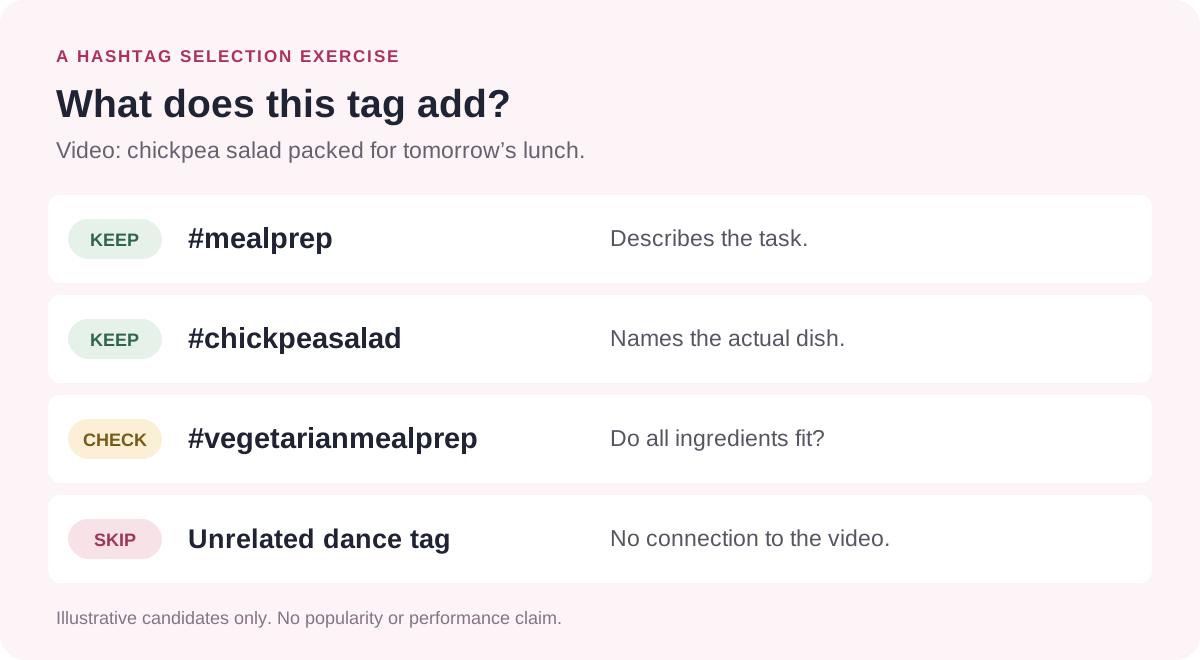
- Keep as candidates: #mealprep describes the task; #chickpeasalad names the dish; #vegetarianmealprep fits if every ingredient shown is vegetarian.
- Check first: #budgetmeals needs a price-based reason. If the video never discusses cost, choose a clearer description.
- Remove: an unrelated dance-challenge tag. Also avoid #highprotein unless you can support the nutritional claim.
Caption draft: “Chickpea salad for tomorrow’s lunch: chop, mix and pack. #mealprep #chickpeasalad #vegetarianmealprep”
The choices progress from the general task to the exact dish and a supported dietary detail. There is no need to add every possible synonym for lunch.
Example 2: a beginner bodyweight-squat lesson
Video: a coach demonstrating stance and control for a bodyweight squat, without weights or a full training plan.
- Keep as candidates: #bodyweightsquat identifies the movement; #squatform identifies the teaching goal; #beginnerstrength fits the intended level.
- Check first: #homeworkout can fit the setting, but the caption should explain that this is one movement lesson.
- Remove: #advancedlifting if no advanced instruction appears, or #weightloss when the video offers no supported discussion of weight change.
Caption draft: “Your first bodyweight squat: a closer look at stance and control. #bodyweightsquat #squatform #beginnerstrength”
The lesson’s scope matters more than filling the caption with every fitness tag. The labels should help describe the instruction without expanding its claims.
Example 3: a software demo using exported TikTok comments
Video: exporting available comments, then filtering an Excel sheet to collect recurring audience questions.
- Keep as candidates: #excel and #exceltips fit the demonstrated spreadsheet steps; #commentanalysis describes the use case if the video actually interprets the discussion.
- Check first: #socialmediamarketing fits when the explanation is aimed at marketers using those questions for content planning.
- Remove: #tiktokgrowth if the demo does not show or establish a growth result.
Caption draft: “Turn exported TikTok comments into a question list with an Excel filter. #excel #exceltips #commentanalysis”
The TikTok comment viewer and exporter provides a starting point for inspecting available comments and exporting them. Label the workflow accurately: exporting comments from a public work is different from searching every comment a person has ever made.
How many hashtags should you use on TikTok?
Start with a few distinct, relevant labels and stop when another tag adds no useful information. The three-tag captions above are deliberately short examples, not an official count or an optimal formula.
Follow the limit shown in your own posting interface. This guide does not assume a universal maximum or use an old caption-character allowance to infer how many tags you can add. Platform limits and editorial recommendations are different questions.
Should you mix broad and niche hashtags?
A broad topic and a precise subject can both help describe one video. For the recipe example, #mealprep and #chickpeasalad do different jobs. A fixed ratio of broad, medium and small tags is unnecessary for making that choice.
Use the same relevance check on every candidate. A niche label is not automatically useful because it is small, and a broad one is not automatically wrong because it is popular.
Do #FYP and #ForYou help?
Do not treat them as admission tickets to the For You feed. In its 2020 tips for creators, TikTok said those tags did not necessarily improve that placement and that adding more hashtags did not guarantee broader reach. That is dated guidance, not a current ranking experiment.
For this workflow, prioritize a label that explains the subject. If the only reason for a tag is that you hope it will trigger distribution, you have not identified what it adds to the description.
Review results without giving hashtags all the credit
Keep a simple record of your choices. The purpose is to make the next decision better, not to prove that one tag caused a successful post.
| Record | What to write down |
|---|---|
| Video and date | The link, publishing date, topic and intended viewer. |
| Candidate research | Search phrases, Creative Center region, time window and research date. |
| Chosen tags | The final set and a short reason for each choice. |
| Other differences | Opening, duration, format, offer and any paid promotion. |
| Observation window | A consistent interval after publishing, rather than comparing an hour-old post with a month-old one. |
| Available outcomes | Views, watch behavior, relevant comments and your own search-performance data where accessible. |
Compare several reasonably similar posts before forming a conclusion. Changing the topic, opening, length and tag set together leaves you unable to isolate the tags. Even a careful organic comparison is observational; timing and audience exposure can differ.
TikTok’s Creator Search Insights includes search-performance analysis for your posts. Check what is available in your account. Public counters on another creator’s video do not reveal which hashtag, if any, led someone there.
Keep your research in context.
Explore available public videos, captions and discussions. Note what the video actually delivers before borrowing a label from its caption.
Explore a public videoFrequently asked questions
What are the best hashtags for TikTok?
The best candidates depend on the video. Start with its actual topic, specific task and intended audience, then inspect relevant search results. A list of popular tags cannot establish whether those labels describe your clip.
Should I copy hashtags from a viral video?
Use the post as a research lead. Check whether its subject, audience and format match yours, and keep only the tags you can justify independently. A public view count does not show that the hashtags caused the result.
Should every video use different hashtags?
Not necessarily. A recurring series may share accurate topic labels. Review the set for each episode and change tags when the subject, setting or audience changes. Replacing relevant tags only to make the list different does not improve its accuracy.
Are trending hashtags better than niche hashtags?
Neither category wins automatically. Inspect the videos behind the tag and its regional and time context. A trend belongs in your caption when your video actually participates in it; a niche tag belongs when it describes a useful detail.
Can a hashtag generator choose the tags for me?
It can suggest candidates, but you still need to verify meaning, relevance and current context. Do not accept unsupported trend or reach claims. ttokviewer provides public-content viewing workflows, not a hashtag generator or popularity ranking.
Where should I put hashtags?
For this workflow, place the chosen labels after a readable description in the post caption, within the limits your posting interface allows. Do not rely on a separate comment as a guaranteed workaround for caption limits or distribution.
Can hashtags guarantee that my TikTok will go viral?
No. A relevant label describes the content; it does not guarantee views, a particular audience or a place in the For You feed. Review the video itself and your available performance data instead of treating a tag combination as a promise.
Sources & editorial notes
Reviewed October 24, 2026. The selection checklist, captions and three worked examples are editorial illustrations, not creator case studies, verified trends or measured growth results. No controlled hashtag experiment or private creator analytics was accessed. The examples use no live popularity figures.
Platform feature descriptions draw on the official sources below. The Creative Center help guide was accessible in full; the Help Center recommendation, search and Creator Search Insights pages were checked through their available indexed text because direct article access was restricted during review. The 2020 Newsroom advice is dated explicitly. Third-party guides informed the topics to address, not a universal hashtag count.
- TikTok for Business: How to use Trends — Creative Center filters and hashtag analytics; visible update July 2026.
- TikTok Help Center: How TikTok recommends content — content information and user-interaction context.
- TikTok Help Center: Discover and search — searching for content and hashtags.
- TikTok Help Center: Creator Search Insights — search topics and own-post search performance.
- TikTok Newsroom: 5 tips for TikTok creators — August 2020 advice about relevant tags, tag quantity and #FYP.
- Hootsuite: TikTok hashtags guide; Sprout Social: TikTok hashtags guide; Shopify: TikTok hashtags guide — structural references for research methods, examples and common questions.