What to do when TikTok comments are not showing
Open the comments on a second video first. If several comment panels fail, restart TikTok, check your connection and update the app. If the problem affects one post, check its comment permissions and whether the missing text is inside a reply thread. If you can see your own comment but someone else cannot, investigate its visibility separately from the loading problem.
Change one thing at a time and reopen the same post after each check. A missing comment alone does not tell you whether it was filtered, deleted or affected by a temporary error.
First, identify what is missing
Keep the original post link while you test. Moving between a feed preview, a repost and a different upload of the same clip can leave you comparing different conversations.
| What you see | First useful check | Where to go next |
|---|---|---|
| A spinner, error or blank panel on several posts | Reopen the app and try another connection. | App and connection checks |
| Comments work elsewhere, but one video has none | Read any comments-off message and check the exact post. | Single-post checks |
| Your comment appears to you but another person cannot find it | Confirm the same post and expand the same thread. | Your comment’s visibility |
| People cannot comment on your own upload | Review that post’s permissions and your comment filters. | Creator settings |
| A browser or third-party viewer shows fewer rows | Compare the original post, loaded pages and expanded replies. | Browser checks |
This guide covers comments on ordinary posts. LIVE chat has its own controls and moderation, so a missing LIVE message needs the checks offered inside that broadcast.
When TikTok comments are not loading on several videos
Start with a small comparison: open two unrelated posts and try their comment panels. If both fail, work through the app and connection before changing any creator settings.
- Close TikTok fully and reopen the original post. If the problem continues, restart your device. TikTok’s official troubleshooting help recommends restarting the app and device as an initial check.
- Try another connection you normally trust, such as switching between Wi-Fi and mobile data if your plan allows it. Open the same two posts again and note whether the result changes.
- Check your device’s official app store for a TikTok update. Install an available update, reopen TikTok and repeat the comparison.
- Look in TikTok’s settings for its cache or storage controls. If your version offers Free up space, choose Clear beside Cache and read the confirmation. Leave drafts, downloads and other storage categories alone.
Clearing a cache is a local troubleshooting step. It cannot approve a creator’s filtered comment or restore text someone removed. Avoid treating your phone’s Clear storage or Clear data command as the same action.
If the app still fails, try opening the same available public post on TikTok’s website. A working web panel gives you a useful comparison for a support report. If both fail, save the error and try again later; that result alone does not establish a platform-wide outage.
When comments are missing on just one TikTok
If other posts work, stay with the affected video. Read any message beside its comment panel before repeating app-wide fixes. A message saying comments are disabled calls for a permission check; an endless spinner calls for a loading check.
Expand the reply control beneath the relevant main comment. A reply can sit inside that thread rather than appear as a separate top-level item. If the interface offers a comment filter or sort option, note the selected view while comparing results.
For example, if a friend says they replied to “Where is this from?”, open that parent comment’s replies on the exact same post. Searching only the main list can miss the conversation they mean.
A displayed comment total and the rows currently on screen are different observations. Load more available comments before comparing them, and record the time of the comparison. A mismatch by itself cannot tell you which comments were removed or why.
Why is your TikTok comment not showing up for other people?
First confirm what each person can see. Copy the exact post link, note whether you wrote a main comment or a reply, and reopen its thread. If someone helps you compare, use the text and approximate posting time to locate it.
If the comment is still absent, consider the checks you can actually make:
- Read any posting error, removal notice or account message. Keep its wording, and use the review or appeal option if TikTok offers one for that decision.
- If you know the creator, ask whether the comment is waiting in their moderation controls. TikTok’s user-safety help describes Creator Care Mode as adding filters to comments on a creator’s content.
- If there is no notice and you cannot check moderation, record that uncertainty. Your screen alone cannot establish whether a creator removed it, a filter held it or a loading problem affected the comparison.
Repeatedly posting the same text makes the comparison harder. Keep one clear example instead. There is no verified universal waiting time in this guide after which an invisible comment will become public.
Likewise, a missing comment does not prove a “shadowban.” Describe the observed problem when reporting it: which post, which thread, which account could see the text, and when.
If comments are not showing on your own video
You can inspect controls that a viewer cannot. Start with the affected post’s privacy or comment settings, then review the account-level comment audience and moderation options. Keep the audience you intended while investigating.
- Open your post and look for its Allow comments or equivalent setting. Read any explanation if the control is unavailable.
- In Settings and privacy, look under Privacy for Comments. Check who is allowed to comment, rather than assuming every person viewing the post can also reply.
- Review any enabled comment filters, keyword rules or Creator Care Mode. Open the filtered-comment review area if your version provides it, and inspect individual comments before approving or removing them.
- Return to the same post and check whether the issue still occurs. Note which setting or moderation decision you changed.
TikTok’s comment management help and Comment Filters help are the reference points for the controls currently offered. Labels and availability can vary; follow the explanation shown in your app if it differs from this checklist.
For a concrete example, a creator might find that a keyword rule catches a relevant product question. Reviewing that comment gives them a specific decision to make. Turning off every filter would change moderation for future comments as well.
TikTok comments not loading on PC or in a browser
Open the original post directly on TikTok’s website and reload it. If TikTok asks you to sign in to continue, use its own sign-in flow. A third-party page does not need your TikTok password to read available public content.
Compare the same post in another updated browser or a fresh browser profile. If it works there, inspect the original browser’s site permissions and content-blocking extensions. Test changes for the TikTok site one at a time so you can identify what affects the panel.
When the mobile app works and the browser does not, record both results. When only a third-party viewer fails, check that viewer’s error and retry behavior separately. App cache, browser storage and a viewer’s data source are separate places to investigate.
If you are opening a shared video without an account, our guide to watching TikTok in a browser explains the public-link workflow and the prompts you may encounter.
Can you read the public comments another way?
If you have a public post link, the ttokviewer TikTok comment viewer can display the discussion available through its source. Open the post, read the loaded main comments and expand available replies. This can be useful when your immediate task is reading a conversation in a desktop browser.
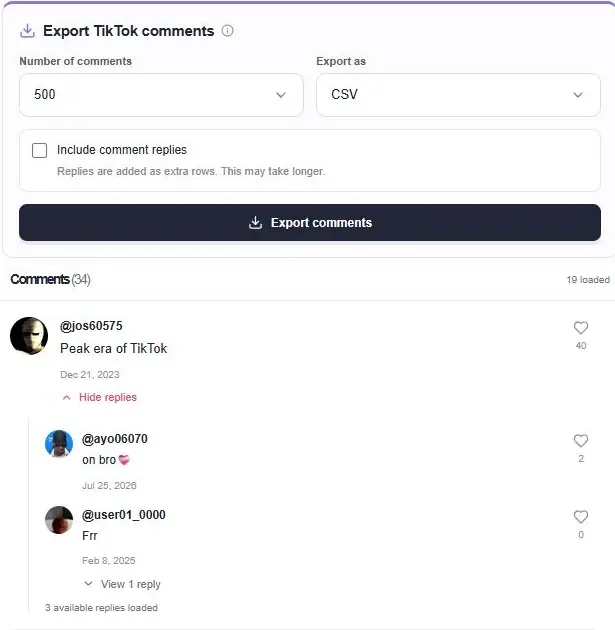
ttokviewer cannot approve filtered comments, change a creator’s permissions, recover deleted text or guarantee every comment in TikTok’s displayed total. If its list is shorter, that is a retrieval limit to investigate rather than proof that TikTok hid specific people.
For research, keep the post URL and collection time with your notes. Our comment analysis guide explains how to preserve thread context and describe the limits of a collected sample.
Read the available conversation.
Open the comments and explore available replies in your browser.
Open the comment viewerWhat to include when reporting a persistent problem
Use the help or reporting option offered in TikTok’s settings, or its official feedback form. A short, reproducible description is more useful than “comments are broken.” Include:
- The original post link and the date and time, including your time zone.
- Your device, operating system, and TikTok app or browser version.
- The symptom: blank list, spinner, posting error, missing main comment or missing reply.
- Whether another post, connection or browser worked, plus the checks already tried.
- A screenshot of the error or affected thread, with unrelated personal information removed.
For example: “At 10:20 a.m. on November 14, the comment panel on this post kept spinning in the Android app. Two other posts loaded. The affected post also failed on Wi-Fi and mobile data, but its comments opened in my desktop browser.” Use your actual results rather than copying that example as a diagnosis.
Frequently asked questions
Why can I see a comment count but no comments?
Check whether the panel failed to load, the post displays a comments-off message or the visible list needs more pages or expanded replies. The total alone does not identify the cause or prove that all counted comments are accessible.
Why are my TikTok comments disappearing?
Save one example and check for a posting error, removal notice or creator moderation. Confirm the exact post and whether the text was a reply. Without those checks, you cannot tell which explanation applies.
Does clearing the TikTok cache restore missing comments?
It is a local loading check. It cannot reverse deletion, approve filtered comments or change who is allowed to comment. Read the storage labels carefully and choose only the cache action you intend.
Can I turn comments back on for someone else’s video?
The creator’s comment controls belong to their account. As a viewer, read the available permission message or contact the creator if appropriate. A public comment viewer cannot change that setting.
How long does it take for a hidden comment to appear?
This guide does not establish a universal delay. A moderation decision, a loading error and removed text require different follow-ups. Use any notice TikTok provides and keep the original posting time for support.
Can ttokviewer show deleted or filtered TikTok comments?
ttokviewer reads comments available through its public data source. It cannot recover deleted text or reveal a creator’s private moderation queue. Available results can be incomplete.
Sources & editorial notes
Prepared November 14, 2026. This guide combines practical comparison checks with TikTok’s public help references. Official search excerpts were readable, but the linked Support pages remained on loading screens during review. Exact menu sequences and account-specific controls were not tested in the mobile app; follow the labels and explanations available in your version. No platform-wide outage or account restriction was established.